Your control room for Copilot-powered work
Aryx gives you a persistent workspace to ask questions, connect real projects, orchestrate multi-agent workflows, and keep ongoing AI work organized in one app.
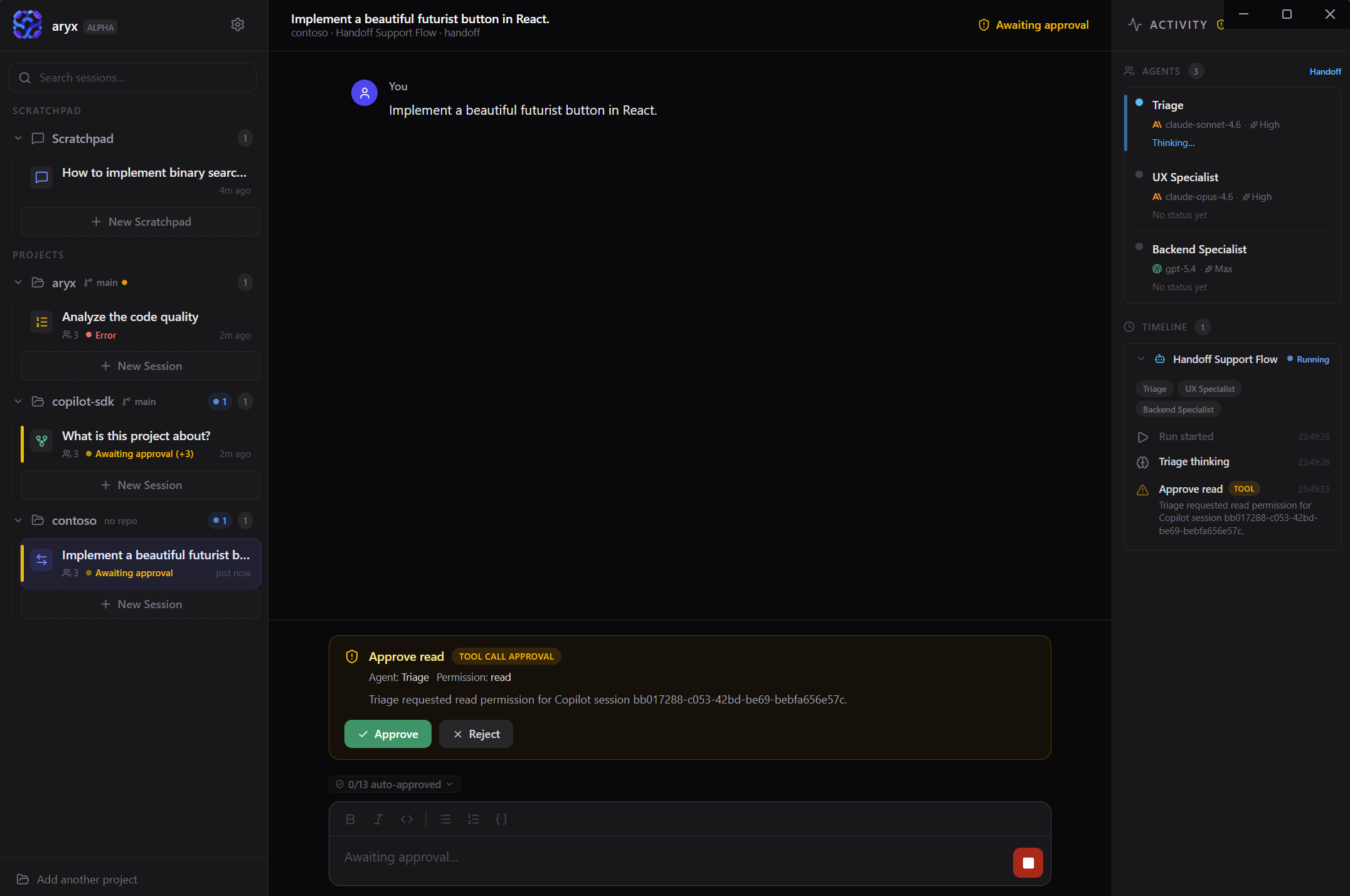
The Aryx workspace — sessions, live activity, and agent orchestration in one place.
Everything you need for structured AI work
More than a chat window. Aryx is built for people who want AI help that stays grounded in real projects.
Agent Orchestration
Go beyond one assistant. Create multi-agent workflows — sequential pipelines, concurrent exploration, handoff delegation, and group-chat collaboration.
Live Visibility
Watch each agent think, delegate to sub-agents, invoke skills, and run hooks in real time. Track token usage and account quota alongside the context-window bar.
Persistent Sessions
Rename, pin, archive, duplicate, and return to sessions later. Search across all sessions by title, content, or project to find past work instantly.
Workspace & Sessions
Start Fast
Scratchpad sessions for quick questions — no project setup.
Persistent Sessions
Rename, pin, archive, duplicate, and return to sessions across restarts.
Session Branching
Fork a session at any user message to explore a different direction.
Session Search
Full-text search across all session messages — not just titles.
Message Actions
Copy, pin, edit-and-resend, and regenerate individual messages.
Bookmarks
Browse all pinned messages across sessions in one panel via Ctrl+Shift+B.
System Tray
Minimize to tray, quick-launch scratchpads, see running session count.
Desktop Notifications
Native OS alerts when runs complete, fail, or need approval.
Guided Onboarding
First-launch walkthrough, interactive tooltips, and a "try it" quickstart.
Agent Intelligence
Mid-Turn Steering
Send follow-ups while the agent works — input is injected immediately.
Plan Review & Questions
Agents propose plans and ask clarifying questions before acting.
Turn Activity Panels
Inline run timeline in each chat turn — tool calls, delegations, hooks, and context at a glance.
Workflow Designer
Visual graph editor with conditional edges, loops, sub-workflows, and node inspection.
Copilot Customization
Auto-discovers instructions, agent profiles, and prompt files from your repo.
Model & Effort Tuning
Choose models, adjust reasoning effort, and set interaction modes per session.
Developer Tooling
Real Project Context
Attach folders and repos — see branch, dirty state, and ahead/behind.
MCP Servers
Define globally, enable per session, auto-discover from project configs.
Tool Approval Controls
Fine-grained policies with workflow defaults and per-session overrides.
Integrated Terminal
Full PTY-backed terminal inside the workspace. Toggle with Ctrl+`.
Image Input
Attach screenshots, diagrams, or photos for visual reasoning.
Command Palette
Ctrl+K fuzzy search across actions, sessions, and settings.
Keyboard Shortcuts
Comprehensive keybindings with a cheat sheet via Ctrl+/.
Project Hooks
Auto-discovers .github/hooks and runs lifecycle hooks in the sidecar.
Five ways to orchestrate agents
Choose how agents collaborate — from simple one-on-one help to complex multi-agent workflows. Save workflows and reuse them across projects.
Single
Direct one-on-one help with a single agent.
Sequential
Pipeline-style work where each agent builds on the previous.
Concurrent
Parallel exploration with aggregated results.
Handoff
Agent-to-agent delegation with specialist routing.
Group Chat
Round-robin collaborative refinement across agents.
Workflow Designer
Visual Graph Editor
Drag agent nodes, draw connections, and inspect each step on an interactive canvas.
Rich Templates
Eight hand-crafted templates — code review, research, triage, content creation, debates, and more.
Conditions & Loops
Add conditional edges and iteration limits to build workflows that branch and repeat.
Sub-Workflows
Nest workflows inside workflows and navigate between levels with breadcrumbs.
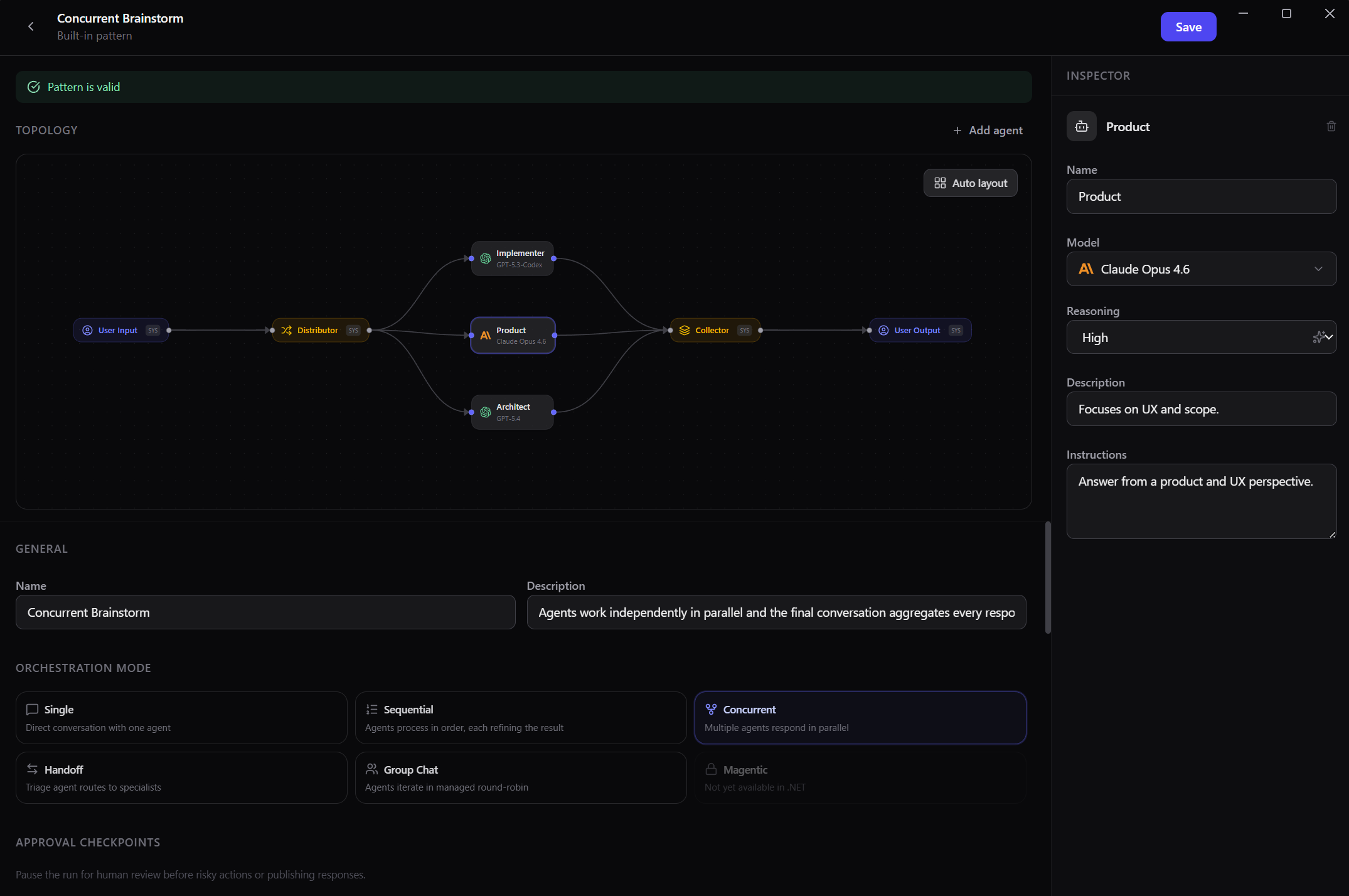
Multi-agent runs stay visible in one workspace while workflows stay reusable across projects.
Get started in four steps
From download to your first AI-powered session in minutes.
Download & Launch
Grab the latest release from GitHub and open Aryx. The app shows your Copilot connection status so you'll know right away if authentication is ready.
Connect a Project
Add a local folder or git repository, or start with a scratchpad for quick questions without project setup.
Pick a Workflow
Choose a single-agent chat for direct help, or select a multi-agent workflow for more structured orchestration.
Start Working
Ask questions, describe tasks, or explore your codebase. Watch agents work in real time and keep sessions for later.
Available for Windows, macOS, and Linux